
On Paralon you can see each of your machines in the dashboard. Past a handful of machines you want what every operator wants instead: one screen with every GPU's temperature and load over time, and a message when something goes wrong. Your fleet already reports everything that screen needs. The Paralon agent on each machine sends a reading about once a minute, and the provider API hands you the latest one for every node in a single call.
This guide turns that call into Prometheus metrics and a Grafana dashboard, with alert rules, started by one command.
What you need
- A Paralon API key with the My nodes permission (Console → API keys). Nothing else: the exporter only reads.
- Docker with Compose, anywhere with internet access. Nothing is installed on the GPU machines.
Everything is in the monitoring/ folder of our open-source provider tools repository (MIT):
git clone https://github.com/ParalonCloud/paralon-provider-tools
cd paralon-provider-tools/monitoring
Start it
export PARALON_API_KEY=prlc_your_key
docker compose up -d
Open http://localhost:3000 (Grafana's first login is admin / admin, then it asks for a new password), and the Paralon fleet dashboard is under Dashboards → Paralon. Prometheus is on http://localhost:9090 if you want to query it directly.
What the exporter does
paralon_exporter.py is about 130 lines of standard-library Python. On each scrape it calls GET /api/v1/nodes once for the whole fleet and writes the answer in Prometheus format:
paralon_node_state{node="0759f45f-…",name="4090",state="rented"} 1
paralon_node_available{node="0759f45f-…",name="4090"} 1
paralon_node_price_usd_per_hour{node="0759f45f-…",name="4090"} 0.54
paralon_gpu_utilization_percent{node="0759f45f-…",name="4090",gpu="0"} 100
paralon_gpu_temperature_celsius{node="0759f45f-…",name="4090",gpu="0"} 68
paralon_gpu_power_watts{node="0759f45f-…",name="4090",gpu="0"} 449.63
paralon_gpu_memory_used_mb{node="0759f45f-…",name="4090",gpu="0"} 2514
paralon_host_cpu_percent{node="0759f45f-…",name="4090"} 100
That is a real scrape of one of our RTX 4090 nodes during a rental. Every series carries the node's id and its name, and GPU series the GPU's index, so a machine with eight cards shows eight lines.
| Metric | What it is |
|---|---|
paralon_node_state{state=…} | 1 for the node's current state: available, rented, paused, not_verified, not_ready, offline |
paralon_node_online, paralon_node_available | Agent connected; node on the market |
paralon_node_price_usd_per_hour | What a new rental pays per hour |
paralon_gpu_utilization_percent, _temperature_celsius, _power_watts, _memory_used_mb, _memory_free_mb | Each GPU's last reading |
paralon_host_cpu_percent, paralon_host_memory_used_mb | The machine's CPU and memory |
paralon_node_metrics_age_seconds | How old the last reading is |
paralon_api_up, paralon_api_seconds | Whether the last API call worked, and how long it took |
The exporter caches the API answer for 30 seconds, so several Prometheus servers or a fast scrape interval still make one call per window. The agents report about once a minute, so scraping more often than every 60 seconds only repeats readings; prometheus.yml is set to 60 seconds.
The alerts
alerts.yml has four rules:
| Alert | When |
|---|---|
GPUHot | a GPU at 85 °C or more for 5 minutes |
NodeOffline | a node on the market whose agent has been offline for 10 minutes: renters cannot get it, and it may not be your network |
NodeNotRentable | a node stuck in not_verified or not_ready for 30 minutes (the API's verification.error and rent_ready_reason say why) |
ParalonAPIDown | the exporter cannot reach the Paralon API for 5 minutes |
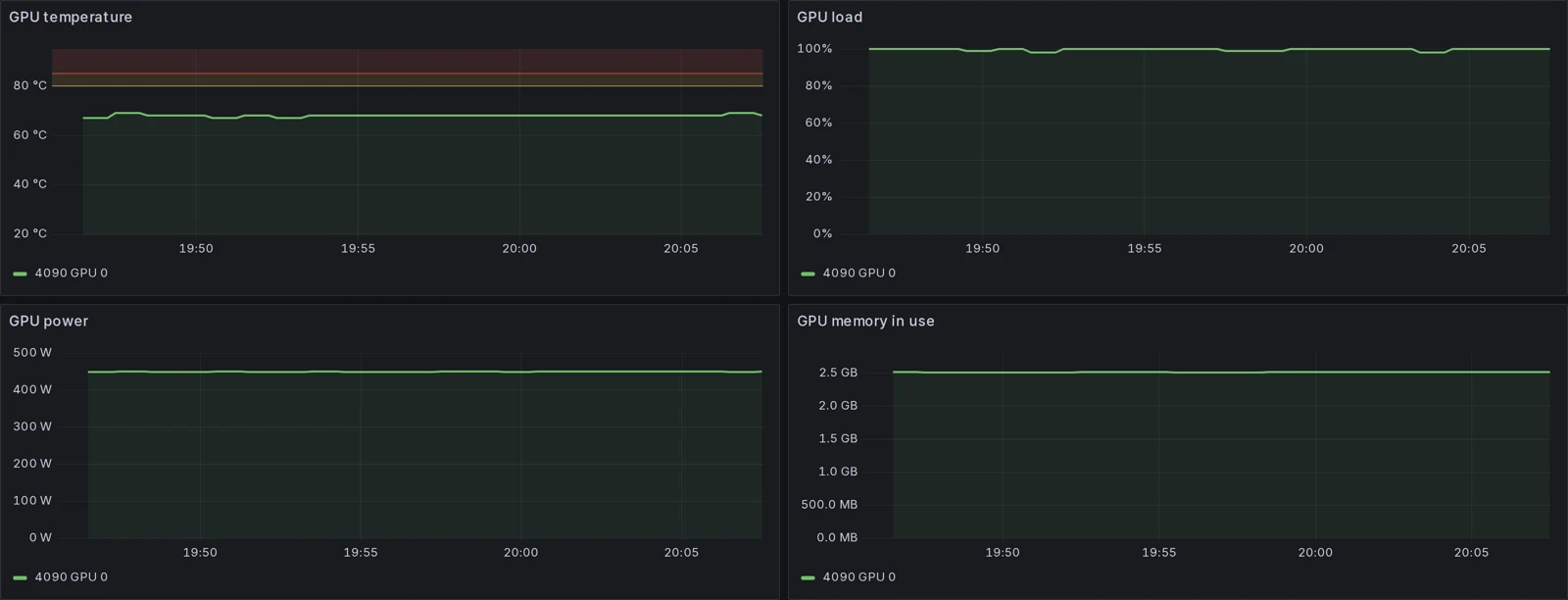
The thresholds are a starting point. Consumer cards such as the RTX 4090 run in the high 60s to 70s °C under full load in a ventilated case; ours sat at 68 to 69 °C at 100% load and about 450 W while we wrote this. A card that holds 85 °C has an airflow, fan curve or dust problem long before it throttles.
As shipped, the rules fire in Prometheus (Status → Alerts) and you can show them in Grafana. To be told, add Alertmanager to the compose file and route the alerts to email, Slack or Telegram, or rebuild them as Grafana alert rules with a contact point.
What we tested
We ran the stack exactly as above against our own account: Prometheus scraped the exporter with target health up, the four rules loaded, and the dashboard was provisioned on first start. NodeOffline went to pending on its own within the first scrape, because some of our test machines have been offline for months while still marked available, which is exactly the case it is there for. The screenshot above is that instance.
For a large fleet
One scrape is one call, whatever the size of the fleet, and the answer is well under 1 KB per node. A call took 0.1 to 0.2 seconds from a server in Germany (paralon_api_seconds reports it). The key's per-minute rate limit is shared with anything else using the same key, so give monitoring its own key with only the My nodes permission: if it ever leaks, it can read your fleet and change prices or availability, but it cannot spend credits or touch payouts.
To act on what you see, the same API takes a node off the market (PATCH /nodes/{id} with {"available": false}), for example while you fix the fan on the card that tripped GPUHot. The provider API docs list every field and call.
Frequently asked questions
Do I have to install anything on the GPU machines?
No. The Paralon agent on each machine already reports load, temperature, power and memory about once a minute. The exporter reads them for the whole fleet from the provider API, so it can run anywhere with internet access, even on a laptop.
Which key does the exporter need?
A Paralon API key with only the My nodes permission (Console, API keys), in PARALON_API_KEY. It only reads: it never changes a node, a price or anything else.
How fresh are the numbers?
The agents report about once a minute, so a reading is at most about a minute old; paralon_node_metrics_age_seconds says exactly how old. Prometheus scrapes every 60 seconds and the exporter caches the API answer for 30 seconds, so several scrapers still make one call.
Will the alerts message me?
The rules fire in Prometheus and show in Grafana as they are. To get them by email, Slack or Telegram, add Prometheus Alertmanager (or use Grafana's own alerting) and point it at your channel.
Can I see who rented my node?
No. The API reports that a node is rented, since when and at what price, never the renter.