
Z-Image Turbo is one of the most used image models in ComfyUI right now: fast (8 steps), photorealistic, good at text inside the image, and released under Apache 2.0, so what you make with it is yours to use commercially. You can run it on ParalonCloud two ways, and which one is cheaper depends on how many images you make.

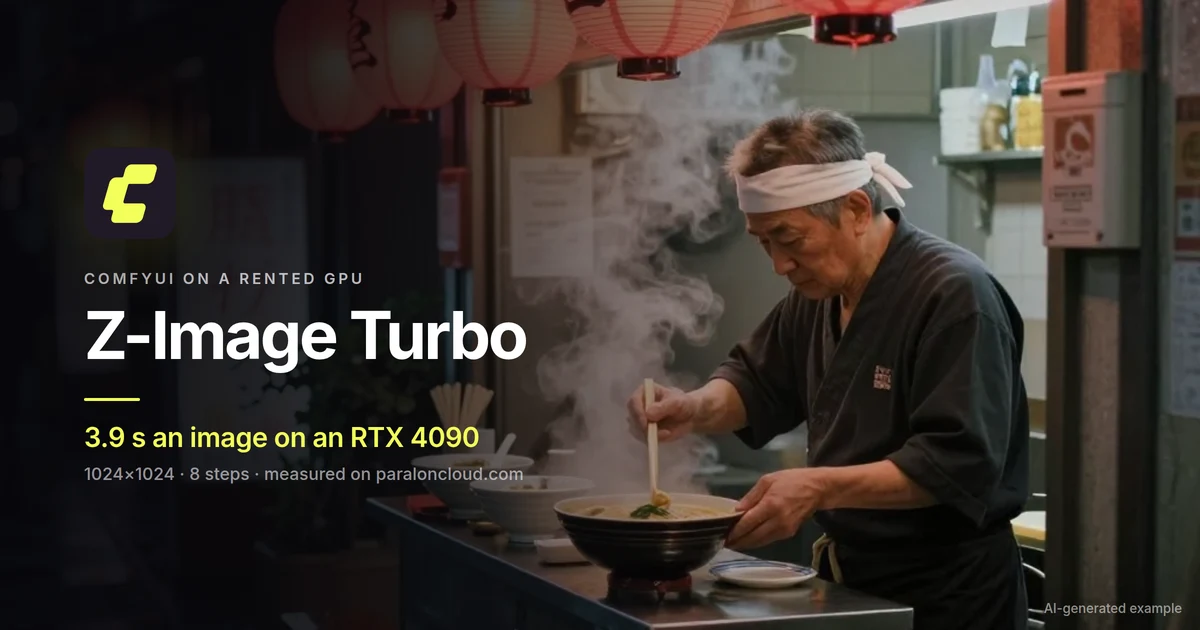
AI-generated with Z-Image Turbo, 1024×1024, seed 4101. Prompt below.
What we measured
On an RTX 4090 rented on ParalonCloud, running ComfyUI's own Z-Image-Turbo: Text to Image template with its default settings (1024×1024, 8 steps):
| RTX 4090 (24 GB) | |
|---|---|
| First image (loads the models) | 36.1 s |
| Every image after | 3.8 to 3.9 s |
| Images per hour, back to back | about 935 |
| Peak VRAM | 21.3 GB |
| Models to download | about 20 GB (once per rental) |
The 21 GB of VRAM is what ComfyUI chooses to keep loaded, not what the model needs: it holds the image model (11.5 GB), the Qwen text encoder (7.5 GB) and the VAE together so it never reloads them. On a 16 GB card it moves the text encoder out after reading the prompt and carries on, a little slower. So Z-Image Turbo runs on any card we offer ComfyUI on, from 16 GB up.
API or rented GPU: which is cheaper
| Image API | ComfyUI on a rented RTX 4090 | |
|---|---|---|
| Price | $0.003 an image | per minute while it runs (see the 4090 price) |
| Start | instant | about a minute, plus the 20 GB download |
| Per image at volume | $0.003 | about $0.0005 at $0.45/h |
| Control | prompt, size, seed | everything: LoRAs, workflows, upscalers, ControlNet |
At $0.45 an hour, the rented 4090 pays for itself above 150 images an hour. Below that, or for images inside your own app, the API is simpler and cheaper; above it, or when you want your own workflow, rent the GPU.
Run it in ComfyUI on a rented GPU
- Pick a GPU with 16 GB of VRAM or more, choose ComfyUI in the first step of Rent, and start it. Rent a GPU for ComfyUI walks through it.
- Open ComfyUI, then Templates, then Z-Image-Turbo: Text to Image.
- Press Download to this GPU in ComfyUI's top bar. The three model files (about 20 GB) download onto the rented machine, each into its folder.
- Write your prompt and press Run. The first image takes longer while the models load; from the second one on, about 4 seconds each on a 4090.
The prompt of the example above:
A tiny ramen stall on a rainy Tokyo side street at night, glowing red paper lanterns,
steam rising from bowls, neon signs reflected in puddles, an old cook in a white
headband ladling broth, warm and cool light, cinematic, photorealistic, 35mm,
shallow depth of field
Or call it by API
No GPU to start and nothing to download: the same model behind an OpenAI-compatible endpoint, billed per image.
curl https://paraloncloud.com/v1/images/generations \
  -H "Authorization: Bearer $PARALON_API_KEY" -H "Content-Type: application/json" \
  -d '{"model": "z-image-turbo", "prompt": "A tiny ramen stall on a rainy Tokyo side street at night", "size": "1024x1024", "seed": 4101}'
The example image on this page came from exactly this call.
Good to know
- Licence. Z-Image Turbo is Apache 2.0: commercial use of the model and its images is allowed.
- Text in images works well for short words and signs; long sentences still come out garbled now and then, as in the lanterns above.
- Everything is deleted when the rental ends, the models too. If you come back tomorrow, the 20 GB download comes back with you; on a fast line it takes a few minutes.
Ready? Pick a GPU and choose ComfyUI, or get an API key.